The Mac desk mouse I would actually buy (Logitech MX Master 3S for Mac)
As an Amazon Associate, I earn from qualifying purchases (tag: mzulfaas-20). Same price for you.
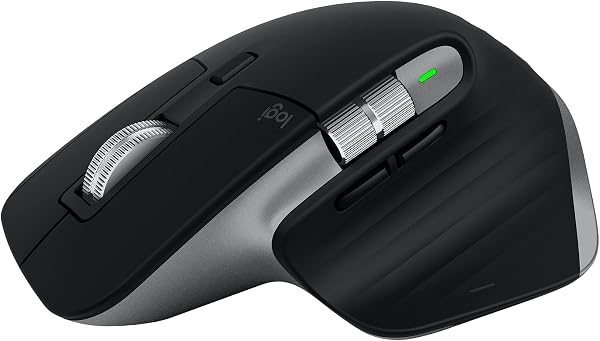
A MacBook trackpad is fine on a train. On a desk, after a few hours of code reviews and browser tabs, my wrist starts asking for something else. That is why the Logitech MX Master 3S for Mac is the mouse I would actually buy for a Mac desk: ergonomic shape, quiet clicks, MagSpeed scrolling, and Bluetooth that talks to macOS without a Windows-first dongle story.
This is a buying note, not a claim that I have run a six-month lab test. Specs below come from Logitech’s product page and the Amazon listing for ASIN B09HMV6K1W (Space Grey). I am not going to pretend I A/B’d every productivity mouse on the market.
Why this particular MX Master 3S for Mac
There is a regular MX Master 3S and a Mac-labelled one. The Mac listing (B09HMV6K1W) is finished in Space Grey / Pale Grey, ships with a USB-C to USB-C cable, and is sold as Bluetooth-first for macOS and iPadOS. The Logi Bolt USB receiver is not included with this SKU — Logitech notes it is compatible with Logi Bolt if you already own one, but this box is aimed at Bluetooth Mac setups.
Headline specs from the listing: Darkfield optical sensor up to 8,000 DPI with track-on-glass (Logitech cites about 4 mm minimum glass thickness), Quiet Clicks (Logitech claims about 90% less click noise vs the prior MX Master 3 for Mac), MagSpeed electromagnetic scroll wheel, seven controls including thumb wheel and gesture button, rechargeable Li-Po battery (500 mAh) with up to 70 days on a full charge and about three hours of use from a one-minute quick charge, weight about 141 g, size about 124.9 × 84.3 × 51 mm.
What I actually want from a Mac desk mouse
- Comfort over flash. The sculpted right-hand shape and thumb rest are the whole point. This is not a light gaming shell.
- Quiet enough for an apartment. Quiet Clicks matter when someone else is on a call two metres away.
- Real scrolling. MagSpeed can ratchet for lines or freefall for long pages. That is daily browser and docs work, not a demo trick.
- macOS without fighting it. Bluetooth Low Energy, Easy-Switch across up to three devices, and Logi Options+ profiles for Safari, Chrome, Final Cut, Photoshop, and the rest. Back/forward and deeper gestures need Options+ on Mac — that is an honest five-minute setup, not optional fine print.
- USB-C top-ups. The included C-to-C cable matches the rest of a modern Mac desk cable pile.
It sits next to the same USB-C hub and Keychron Q1 Pro I already wrote about. Mouse, board, hub: one desk story.
The honest caveats
It is right-hand only. Left-handed shoppers need a different product.
Full button remapping and Flow (moving the cursor and files across machines) depend on Logi Options+. Without the app you still get a solid Bluetooth mouse; you do not get the full “MX” workflow.
This is not a gaming mouse. High polling rates and ultra-light shells live elsewhere. For writing, browsing, and design on a Mac, that is fine.
Battery life of “up to 70 days” is a lab-style claim. Leave RGB-style features cranked on other gear and you learn how marketing hours work; treat 70 days as a ceiling, not a promise.
Also: do not confuse this Mac SKU with the Windows-leaning MX Master 3S that ships a Bolt receiver in the box. If you need the receiver for a locked-down PC that blocks Bluetooth, buy the SKU that includes it.
My honest buying call
I would buy the MX Master 3S for Mac (Space Grey, B09HMV6K1W) when the Amazon price is in its normal mid-$100 range and I want a quiet, sculpted desk mouse that pairs cleanly with a MacBook or iMac. It is the productivity default I would point a Mac engineer at before I pointed them at Apple’s Magic Mouse.
I would skip it if I only need a cheap travel mouse, if I am left-handed, if I refuse vendor software on principle, or if I mainly game. For a café bag, look at something smaller (Logitech’s own MX Anywhere line is the usual fork). For a pure Apple look with Multi-Touch gestures and no thumb wheel, the Magic Mouse / trackpad path is still there — just know the trade-offs.
Check the Logitech MX Master 3S for Mac on Amazon
A quick product video
This public review is specifically about the MX Master 3S for Mac. Useful for seeing the shape, buttons, and Mac-oriented box contents; still read the specs above rather than treating a YouTube walkthrough as a long-term reliability test.
Product details and prices can change. Confirm the colour, seller, and return terms on Amazon before buying.
0 Comments
No comments:
Post a Comment