MX Master 3S vs MX Anywhere 3S for Mac: Desk Mouse or Travel Mouse — Which I Would Buy
As an Amazon Associate, I earn from qualifying purchases (tag: mzulfaas-20). Same price for you.
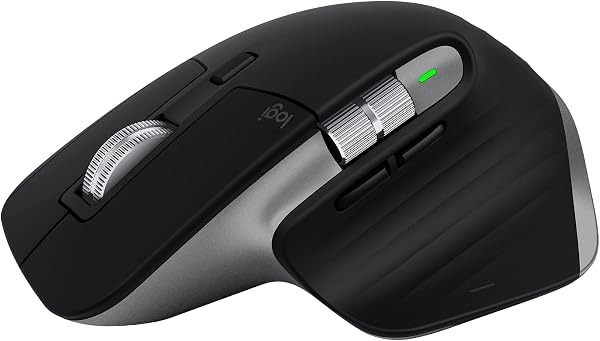

If your Mac mouse mostly lives next to a keyboard on a fixed desk, I would buy the Logitech MX Master 3S for Mac (Space Grey, ASIN B09HMV6K1W). If it has to disappear into a MacBook sleeve for café, coworking, or flight days, I would buy the MX Anywhere 3S for Mac (Space Grey, ASIN B0CVFJ1YSX). Buy both only when you truly split desk vs bag. This page is the fork — not a second full review of each. I already published the deeper MX Master 3S for Mac desk note and the MX Anywhere 3S for Mac travel note.
This is a buying note from a Mac engineer in Jakarta, not a fake six-month lab. Specs reuse Logitech / Amazon listing language from those notes — no invented lab scores or search metrics.
Quick verdict: desk mouse or travel mouse
For a Mac, buy the Logitech MX Master 3S for Mac (ASIN B09HMV6K1W) if the mouse mostly stays on a desk and you want palm support plus a dedicated horizontal thumb wheel. Buy the MX Anywhere 3S for Mac (ASIN B0CVFJ1YSX) if it has to ride in a laptop sleeve for café, coworking, or travel days. Both share quiet clicks, MagSpeed scrolling, high-DPI Darkfield tracking, Easy-Switch, and USB-C charging; the real fork is size and controls, not the sensor sheet.
- Buy Master when… the mouse sleeps on a desk; you want all-day palm support; spreadsheets, timelines, or horizontal nav make the thumb wheel worth the bulk.
- Buy Anywhere when… the mouse sleeps in a sleeve; café tables and hotel desks are normal; smaller hands or a lighter claw/fingertip grip fit better than the Master sculpt.
- Buy both when… you already keep Master as desk furniture and refuse to pack ~141 g of sculpt into a bag — Anywhere becomes the travel mouse, not a replacement.
- Skip both when… you are left-handed (both are right-hand only), you only want Magic Mouse Multi-Touch gestures, you refuse Logi Options+ on principle, or you mainly need a gaming mouse.
Check MX Master 3S for Mac on Amazon → · Check MX Anywhere 3S for Mac on Amazon →
Same tech, different job
Once you strip the marketing, the two Mac mice share the same core story. Both list a Darkfield optical sensor up to about 8,000 DPI with track-on-glass (Logitech cites about 4 mm minimum glass thickness). Both advertise Quiet Clicks. Both use MagSpeed electromagnetic scrolling (line ratchet or freefall). Both do Easy-Switch across up to three devices, charge over USB-C, and lean on Logi Options+ for remaps and Flow. Both quote a rechargeable Li-Po pack (500 mAh) with “up to 70 days” on a full charge and about three hours of use from a one-minute quick charge — treat that 70-day figure as a manufacturer ceiling, not a promise for your click habits.
The job fork is physical. The Master is the sculpted desk mouse: about 141 g, roughly 124.9 × 84.3 × 51 mm, seven controls including a dedicated horizontal thumb wheel and gesture button. The Anywhere is the compact travel mouse: about 99 g, roughly 100.5 × 65 × 34.4 mm, six controls with mode-shift horizontal scroll instead of a separate thumb wheel. Same sensor class. Different place the mouse is allowed to live.
Size and bag reality
Do not romanticize packing the Master. In a Jakarta apartment desk setup it feels right — palm rest, quiet clicks when someone else is on a call two metres away, MagSpeed for long docs. In a sleeve next to a MacBook Air it feels like desk furniture you forgot to leave at home. Anywhere is the one that disappears into that sleeve without arguing with a charger brick and a compact board.
Café wood, coworking laminate, and glass conference tables are why Darkfield shows up on both listings — tracking parity is not the decision; Master bulk on a small café table is.
Thumb wheel vs compact controls
If you live in spreadsheets, video timelines, or any UI that wants constant horizontal navigation, the Master’s dedicated thumb wheel is often the whole reason to stay. Anywhere can still do horizontal work via mode-shift on the main wheel, but it is not the same muscle memory as a always-there thumb control. That is the clearest “desk king vs travel mini” split after weight: seven controls with a real thumb wheel versus six controls optimized for a smaller shell.
Mac SKUs: Space Grey, Bluetooth-first, no Bolt in the box
Shop the Mac listings, not a random Graphite multi-OS box that happens to say MX.
- MX Master 3S for Mac — Space Grey / Pale Grey story, ASIN B09HMV6K1W, Bluetooth-first for macOS and iPadOS, USB-C cable in the box.
- MX Anywhere 3S for Mac — matching Space Grey Mac finish language, ASIN B0CVFJ1YSX, same Bluetooth-first kit story, USB-C cable in the box.
On these Mac SKUs, a Logi Bolt receiver is typically compatible but not included. Do not assume the Windows-leaning box that ships Bolt is what you are buying. If a locked-down PC forces a receiver, buy the SKU that actually includes one — that is a different shopping path than these Space Grey Mac ASINs.
What’s different on the Mac boxes? The Mac Space Grey SKUs are Bluetooth-first for macOS/iPadOS and typically include a USB-C cable but not a Logi Bolt receiver. Full remapping and Flow still want Logi Options+ on Mac. Don’t buy a Windows-leaning Graphite/Bolt-in-box listing if you specifically want the Mac finish and Bluetooth-first kit story.
Without Options+ you still get a solid Bluetooth mouse. You do not get the full MX workflow — remaps, deeper gestures, Flow across machines. Budget five minutes for the app if you want what the brochure implies.
Which I would buy (honest scenarios)
Permanent Jakarta / apartment desk + code reviews → Master. Palm support for long browser-and-diff days, Quiet Clicks for shared walls, thumb wheel when a sheet or timeline is open. That is the same call as my desk note: productivity default before Magic Mouse.
Café / coworking / flights + MX Keys Mini travel kit → Anywhere. Pair it with the compact board when the kit has to leave the apartment. Hub can stay home; Anywhere travels. See also the MX Keys Mini for Mac note for the travel-board side of that kit.
Already own Master, leave the desk often → add Anywhere, don’t replace Master for all-day palm work.
Worth buying Anywhere if I already have Master? Yes — if you leave the desk often and refuse to pack the heavier Master. Keep the Master as the all-day desk mouse and add the Anywhere 3S for Mac as the travel mouse. If you almost never leave a fixed desk, skip Anywhere and keep one Master. If you only travel and hate a bulky mouse at home, Anywhere alone can be enough — accept less palm support and no dedicated thumb wheel.
Only one mouse budget → pick by where the mouse sleeps (desk drawer vs sleeve), not by the DPI table. The sensor sheet will not save you from the wrong size.
I would skip the pair entirely if I am left-handed, insist on Magic Mouse Multi-Touch only, refuse vendor software, or mainly game.
Spec snapshot (honest, listing-sourced)
| MX Master 3S for Mac | MX Anywhere 3S for Mac | |
|---|---|---|
| Typical role | Desk / primary workstation | Travel / café / sleeve |
| Amazon ASIN | B09HMV6K1W | B0CVFJ1YSX |
| Finish (Mac SKU) | Space Grey / Pale Grey | Space Grey / Pale Grey |
| Weight (listing) | ~141 g | ~99 g |
| Size (listing) | ~124.9 × 84.3 × 51 mm | ~100.5 × 65 × 34.4 mm |
| Controls | 7 (incl. thumb wheel + gesture) | 6 (mode-shift horizontal scroll) |
| Dedicated thumb wheel | Yes | No |
| Sensor | Darkfield up to ~8,000 DPI | Darkfield up to ~8,000 DPI |
| Quiet Clicks / MagSpeed | Yes (listing claims) | Yes (listing claims) |
| Battery claim | Up to 70 days (ceiling, not promise) | Up to 70 days (ceiling, not promise) |
| Bolt in Mac box | Not included (compatible) | Not included (compatible) |
| Handedness | Right-hand only | Right-hand only |
Prices move. Confirm colour, seller, and return terms on Amazon. Mid-ticket context around these Mac ASINs has often been roughly mid-$100 for Master and ~$80 for Anywhere on Amazon US — not a locked price.
Related Mac desk / travel notes
- The Mac desk mouse I would actually buy (MX Master 3S for Mac)
- The travel Mac mouse I’d pack with MX Keys Mini (MX Anywhere 3S for Mac)
- The compact Mac keyboard I’d pair with a travel mouse (MX Keys Mini for Mac)
Desk mouse or travel mouse: Master for the fixed desk, Anywhere for the sleeve — both only when roles stay split. Confirm the Mac Space Grey ASINs, not a Bolt-in-box Graphite listing.
Check the MX Master 3S for Mac on Amazon · Check the MX Anywhere 3S for Mac on Amazon
Product details and prices can change. Confirm Space Grey Mac ASINs B09HMV6K1W and B0CVFJ1YSX, seller, return terms, and box contents (USB-C cable; Bolt not included on these Mac SKUs) before buying. Specs cited from Logitech / Amazon listing language already used on the Master and Anywhere notes on this site.
0 Comments
No comments:
Post a Comment